
Your organization may already have Microsoft Copilot, ChatGPT, and other AI tools in use. But do employees know what's approved, where to find useful agents, or which guidance applies to their work?
AI Hub Pro by VystaPoint helps answer those everyday questions. It is not another AI chatbot or a replacement for your AI investments. It is a SharePoint-based home for the tools, shared resources, and practical guidance employees need to make better use of AI.
What is AI Hub Pro?
AI Hub Pro brings several parts of an organization's AI experience into a single, familiar destination. Employees can discover available tools, explore shared AI agents, find reusable prompts and skills, and read responsible-AI guidance.
Administrators can support access requests and review shared contributions before they're published.
The important distinction: AI Hub Pro helps employees use and share AI resources more effectively. It does not replace Microsoft Copilot or become the underlying security system for every AI service.
Why does a central AI hub matter?
Without a common starting point, employees can spend time hunting for tools, recreating prompts that already exist, or wondering what information they're allowed to use with AI.
Meanwhile, IT teams need better ways to communicate approved access and responsible-use expectations.
Find the Right Tools
Make approved and restricted options easier to distinguish.
Reuse Good Work
Make useful agents and prompts discoverable beyond their creators.
Provide Practical Guidance
Keep data-handling expectations and AI guardrails easy to find.
Support Oversight
Give employees a clear access-request path and route shared items for review.
AI Adoption Doesn't Have to Mean Losing Visibility
As employees explore AI, IT needs a practical way to communicate which tools are approved, explain appropriate use, and make useful solutions accessible across teams.
AI Hub Pro brings those activities into a familiar SharePoint destination, with access-request paths and administrative review of shared agents and prompts.
For IT teams: Help employees find the right resources and follow your organization's guidance without replacing existing AI tools, Microsoft 365 permissions, or security controls.
What Can Employees Actually Do in AI Hub Pro?
The demonstrations below show the real AI Hub Pro experience, rather than conceptual product mockups.
01 / Approved AI Tools
Know What's Available Before You Start
Instead of guessing which AI tools they can use, employees can browse a directory with useful descriptions, intended use cases, and data-handling tiers. When access is restricted, they can see the requirements and request access.
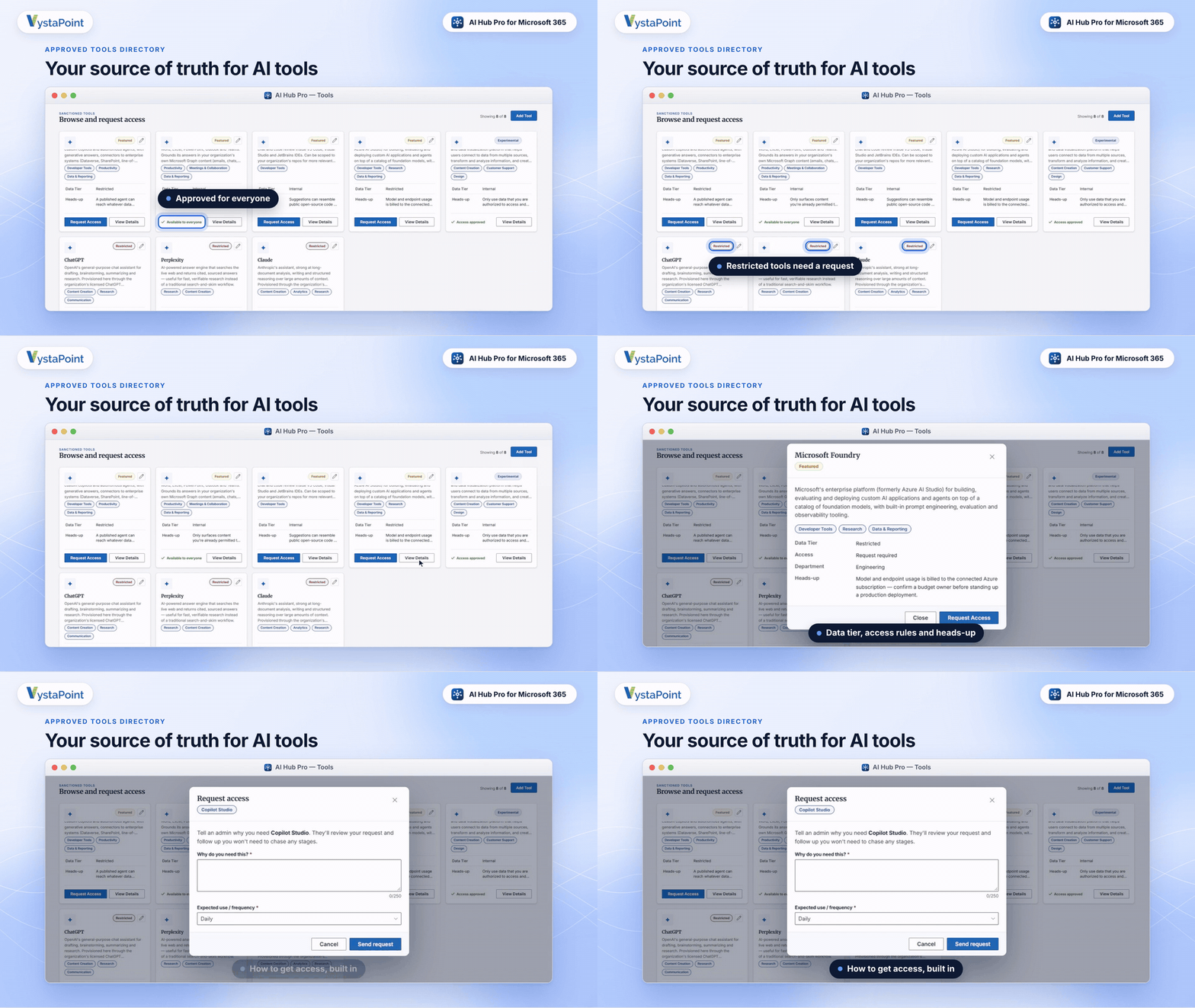
- Discover approved AI tools.
- Review intended uses, data tiers, and access requirements.
- Request access when a tool requires approval.
02 / Agent Showcase
Turn AI Innovation Into Shared Productivity
One team shouldn't have to reinvent an AI solution another team has already developed.
The Agent Showcase helps people find shared, approved agents, learn what each agent is intended to do, and see estimated time savings supplied with the agent information.
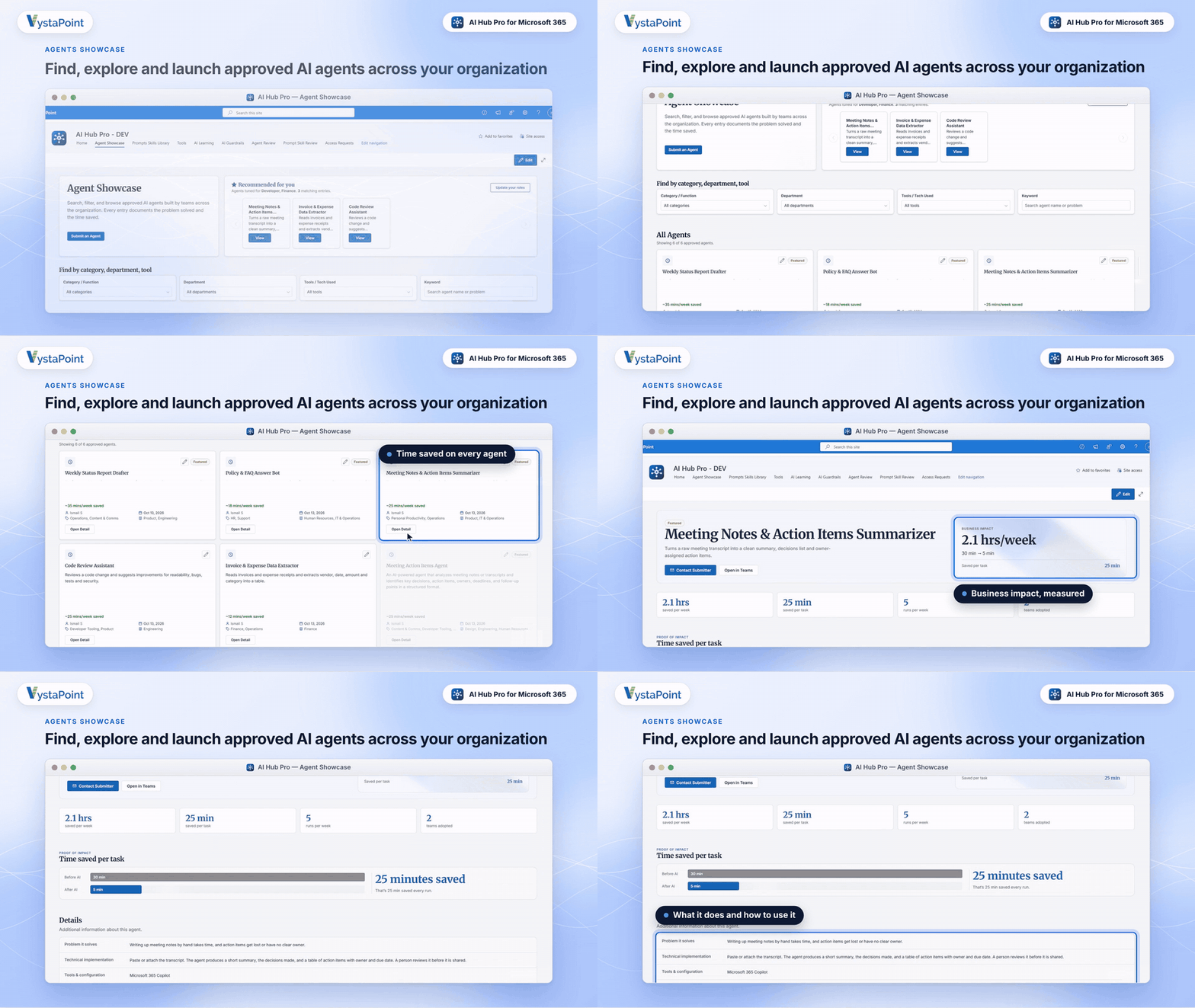
- Browse shared and approved agents.
- Understand what each agent does.
- See submitter-estimated time savings.
03 / Prompts & Skills Library
Stop Starting From Scratch
Great prompts often stay inside someone's private notes or chat history.
AI Hub Pro gives employees a shared library of reviewed prompts and skills they can find, open, and copy for their own work.
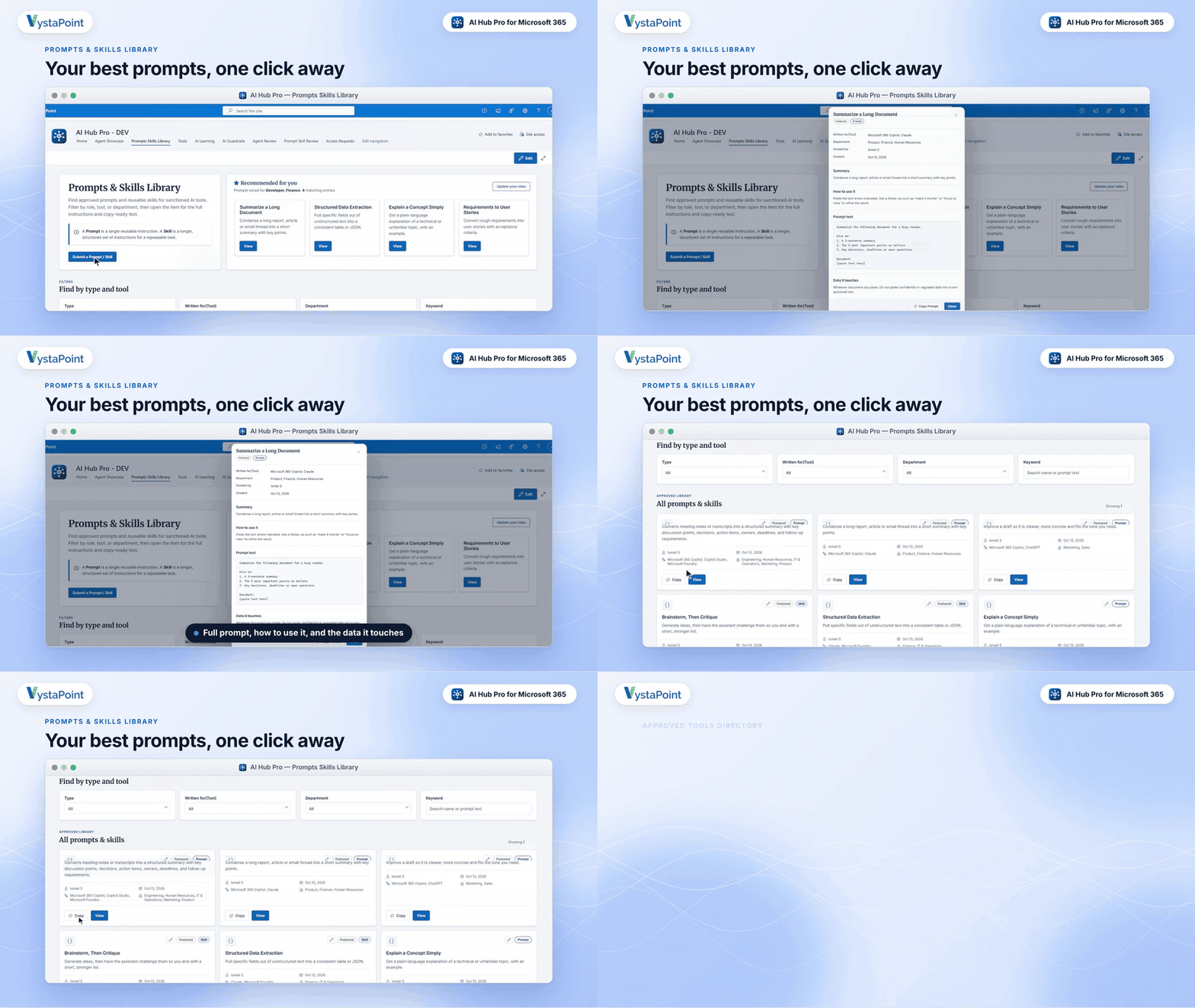
- Find prompts by type, tool, or department.
- Review instructions and usage guidance.
- Copy prompts or submit new ones for review.
04 / AI Governance
Give Employees Clarity. Give IT Control.
Responsible AI adoption becomes easier when employees can find practical guidance at the same time they're discovering AI tools.
AI Hub Pro supports visible tool-access information, request workflows, and administrator review of shared resources.
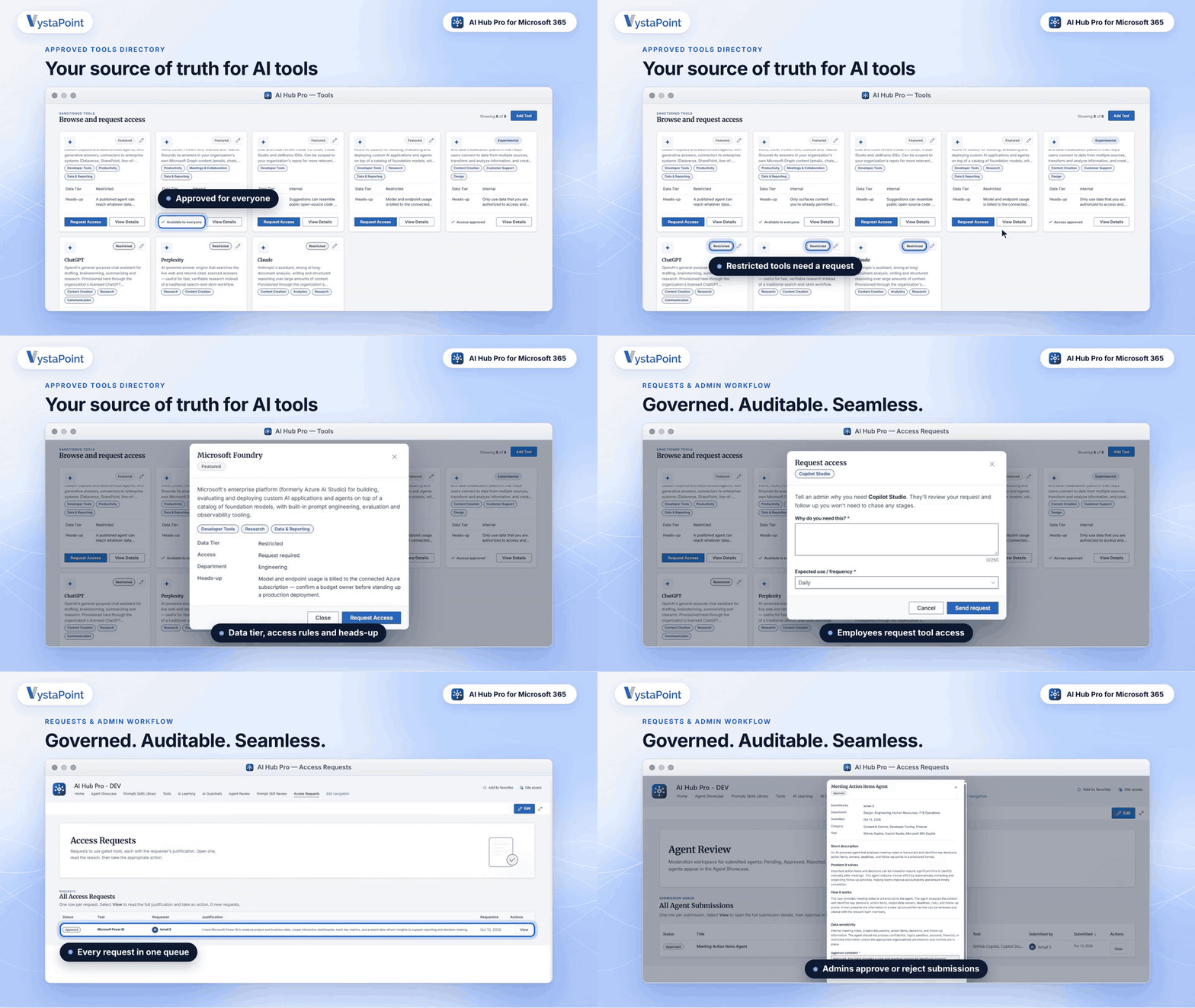
- Communicate approved and restricted tools.
- Provide responsible-use guidance.
- Review submitted resources before publishing.
How Does AI Hub Pro Fit Into Microsoft 365?
AI Hub Pro is built on Microsoft SharePoint, giving organizations a familiar destination for AI resources in their Microsoft environment.
It complements tools such as Copilot rather than replacing them. Exact permissions, setup, and deployment considerations should be reviewed for each organization.
Designed for your existing investment: AI Hub Pro provides an organized starting point for AI discovery and shared knowledge inside SharePoint. Your approved AI applications and underlying Microsoft 365 controls continue to do their own jobs.
Frequently Asked Questions About AI Hub Pro
What exactly is AI Hub Pro?
It's a SharePoint-based hub from VystaPoint that organizes approved AI tools, reusable agents, prompts and skills, learning resources, and responsible-AI guidance in one employee-facing destination.
Why not just build an intranet page with links to AI tools?
A page of links can help with navigation, but AI Hub Pro adds tool details and access guidance, searchable libraries of shared agents and prompts, and request or review workflows.
Does it replace Microsoft Copilot, ChatGPT, or another AI tool?
No. AI Hub Pro is not an AI model or chatbot replacement. It helps employees find the AI resources their organization supports and understand how to use them.
Can employees find agents created by other departments?
Yes. Once an agent is approved and shared, the Agent Showcase helps other employees find it and understand its intended purpose.
Can employees contribute their own prompts or AI agents?
The experience includes submission and review paths for shared resources. Organizations can use these to review contributions before publishing them for broader reuse.
How does it help IT teams with AI governance?
It makes guidance and access requirements easier for employees to find, supports access requests, and offers review workflows for shared content.
It does not replace underlying permission controls, data security policies, or formal compliance systems.
Does AI Hub Pro measure AI usage and return on investment?
The Agent Showcase can display estimated time savings associated with shared agents. These are estimates provided with the agent information—not independent measurements of actual usage, realized savings, or financial ROI.
Is it designed for organizations already using Microsoft 365?
Yes. AI Hub Pro is built on Microsoft SharePoint. A product walkthrough can help your IT team understand deployment requirements and how it would fit your environment.